Most traders have a trading plan. Very few follow it on a bad day. The plan says "stop after two losses", and then the third trade happens anyway. This guide shows you how to write a short trading plan, gives you a sample trading plan you can copy, and shows a free way to get a warning the moment you break one of your own rules.
What is a trading plan?
A trading plan is a short list of rules you write before the market opens: how much you can lose today, how many trades you take, how big each trade is, when you trade, and what you do after a loss. It is not a strategy. Your strategy tells you when to enter. Your plan tells you when to stop.
The best plans are short. If you can't read your plan in 30 seconds, you won't read it in the middle of a losing day.
The 6 rules every day trading plan needs
These are the six rules that cover most blown accounts. Write a number next to each one. A rule without a number is a wish.
- Daily loss limit. The most you can lose in one day before you stop. Pick a dollar amount you can lose without it changing how you trade tomorrow. Prop firm traders already have one: see Topstep's rules explained.
- Max trades per day. Overtrading is the quiet account killer. A cap like "3 trades a day" forces you to wait for your real setup.
- Max position size. The biggest size you are allowed to trade. This stops the "I'll double up to win it back" trade.
- Revenge trade rule. After a losing trade, wait before the next entry. Even a short pause breaks the loop. More on this in our guide to revenge trading.
- Trading hours. The hours you are allowed to trade, for example the first 90 minutes after the open. Trades outside your window are usually boredom trades.
- Stop loss rule. Your stop goes in when you enter, and it only moves toward profit, never away from your entry.
Trading plan example (copy this)
Here is a sample trading plan for a futures day trader. Change the numbers to fit your account. The point is that every rule is a number you can check.
- Daily loss limit: $300. At $300 down, I'm done for the day.
- Max trades per day: 3.
- Max position size: 2 contracts.
- After a losing trade: wait at least 5 minutes before the next entry.
- Trading hours: 9:30 to 11:00 ET only.
- Stops: every trade has a stop on entry. I never move it further from my entry.
These numbers are an example, not advice. Pick numbers that fit your own account size and risk rules.
Why a trading plan on paper isn't enough
Writing the plan is the easy part. The hard part is that you break it when you're emotional, and that is exactly when you're not reading a piece of paper. Nobody checks their plan after a stop-out. They click again.
That's the gap trading discipline tools try to close: something outside your head that notices the break and tells you, right away, while you can still stop.
The Watcher: a free alert when you break your trading plan
The Watcher is a free feature in the TradeCut desktop app. You type in your trading plan once. Then it watches your live trades on TradingView or NinjaTrader and shows an alert on your screen the moment you break one of your own rules.
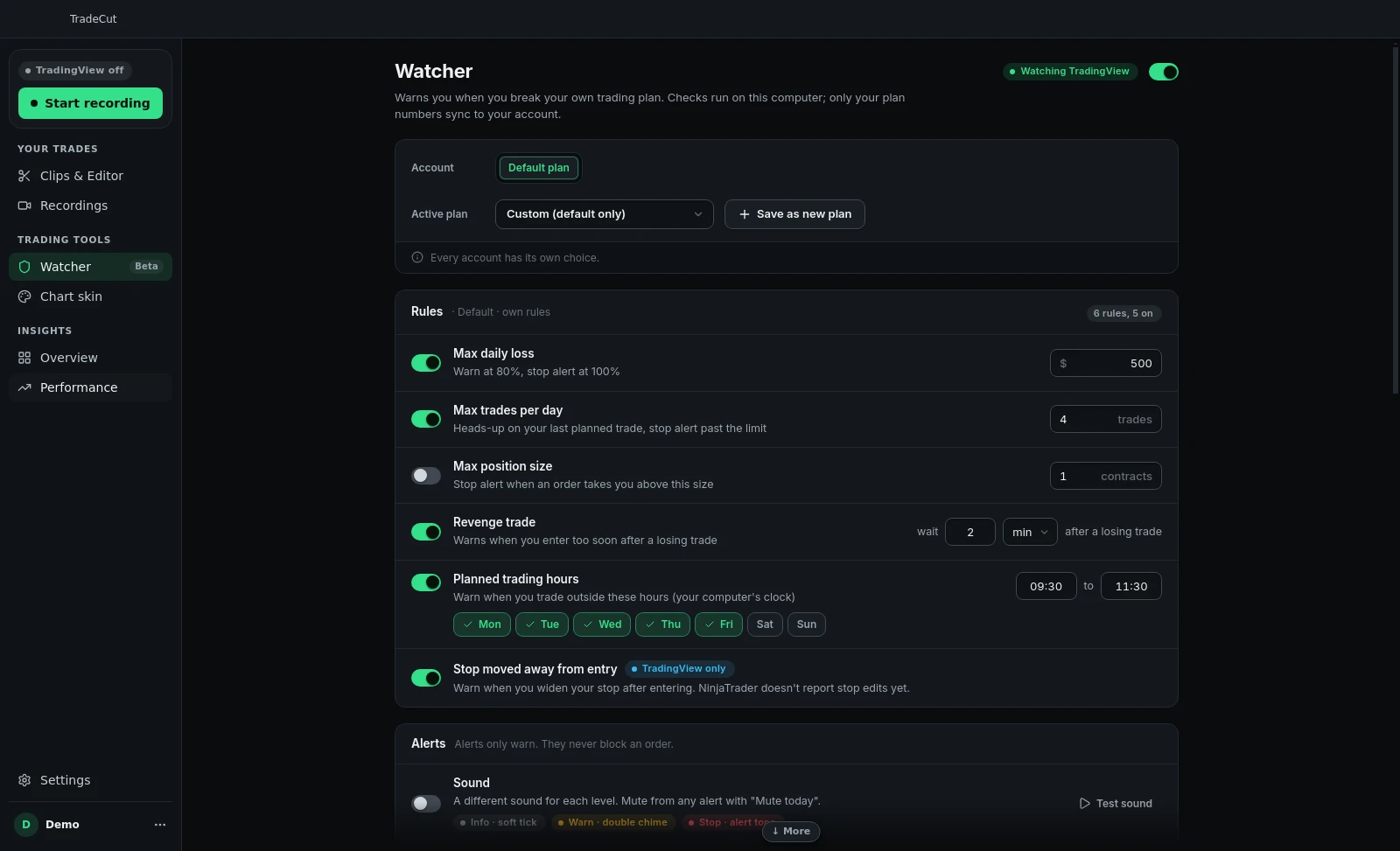
It checks the same six rules from this guide:
- Max daily loss, with an early warning before you hit it (at 80% of the limit by default).
- Max trades per day.
- Max position size.
- Revenge trade: a new entry too soon after a losing trade (60 seconds by default, you choose the wait).
- Planned trading hours.
- Stop moved away from entry, or stop removed (on TradingView).
A few things to know. The Watcher warns you; it never touches your orders or closes a trade. The decision is still yours, it just makes sure you make it on purpose. You can keep a different plan for each trading account, and save named plans to switch between. Alerts are hidden from your recordings by default, so they don't end up in the clips you post.
The "Broke plan" tag
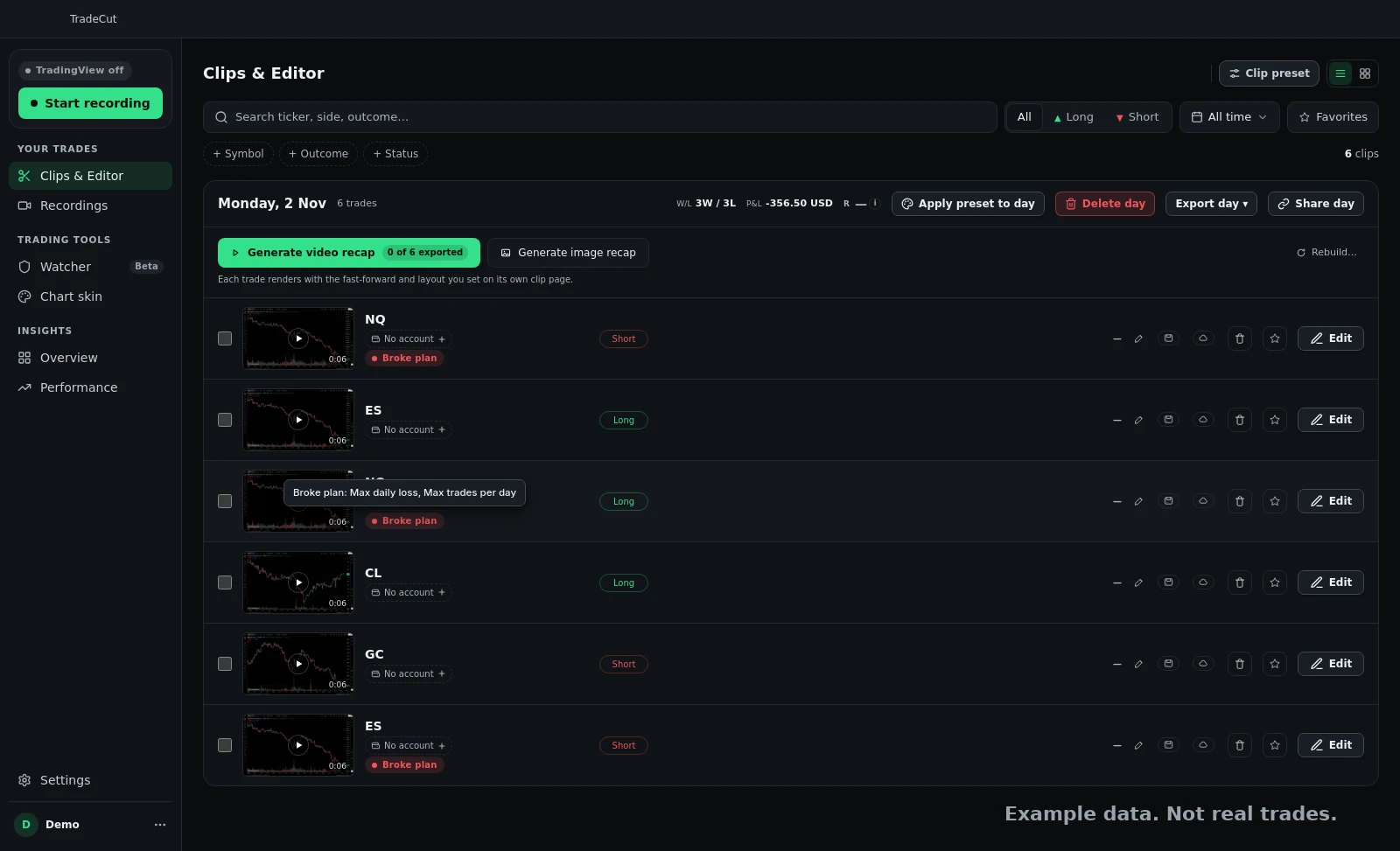
TradeCut records each trade as its own clip. When a trade broke your plan, that clip gets a "Broke plan" tag in your library. At the end of the week you can watch only those trades and see the pattern: same time of day, same setup, same mood. That review is where the plan actually starts to stick. Our guide on how to keep a trading journal shows how to run that review.
Get an alert when you break your plan
The Watcher is free in TradeCut. Write your trading plan once and get a warning on screen the moment a trade breaks it.
Start your free 7 day trialTrading plan template for beginners
If you're new, start with only three rules: a daily loss limit, a max number of trades, and a fixed size. Follow those for two weeks before you add more. A short plan you follow beats a long trading plan template you ignore.
- Write the three numbers before the open.
- Trade.
- After the close, mark every trade that broke a rule.
- Once a week, look only at the trades that broke a rule and write one sentence about why.
What should be in a trading plan?
At least a daily loss limit, a max number of trades per day, a max position size, the hours you trade, a rule for what you do after a loss, and a stop loss rule. Each rule should be a number you can check, not a feeling.
How do I stop overtrading?
Set a max number of trades per day and a pause after every losing trade, then use something that tells you when you go over. The Watcher in TradeCut shows an alert when you pass your max trades or enter again too soon after a loss.
What is a good daily loss limit?
There is no single number. It should be an amount you can lose without it changing how you trade the next day. If you trade a prop firm account, start from the firm's own daily loss limit and set yours below it.
Is the Watcher free?
Yes. The Watcher is free in the TradeCut desktop app. It works with TradingView and NinjaTrader trades.
Can the Watcher close my trade or block an order?
No. It only warns you. It never touches your orders, so the decision always stays with you.
Related posts
- TradingView Themes: Best Chart Colors + Free Animated BackgroundsHow to change TradingView themes, chart colors and background, plus 22 free animated backgrounds (3D and space) you can put behind your candles.
- Revenge Trading: What It Is and How to Stop ItWhat revenge trading is, the signs you're doing it, why it blows up accounts and prop firm challenges, and 7 simple rules to stop after a loss.