Passing the Trading Combine gets you a Topstep funded account: the Express Funded Account, or XFA. The rules change once you're there. The balance starts at $0, the Maximum Loss Limit works differently, and payouts have their own conditions.
This guide explains each one in plain English. All numbers come from Topstep's own Help Center, checked on November 13, 2026. Topstep updates its rules often, so always confirm on help.topstep.com before you trade.
Topstep funded account: the short version
- The XFA is the simulated funded account you get after passing the Trading Combine.
- Its balance starts at $0. "50K / 100K / 150K" is buying power, not the starting balance.
- You can hold up to 5 active XFAs at a time. There is no monthly subscription.
- The account ends if your balance hits the Maximum Loss Limit (MLL).
- At activation you pick a payout path, Standard or Consistency. You can't switch later.
- The profit split is 90/10 on both paths.
What is the Topstep Express Funded Account (XFA)?
The Express Funded Account is the step after the Trading Combine. It is a simulated account, and Topstep calls it the XFA, so "Topstep XFA" and "Topstep Express Funded Account" mean the same thing.
The part that surprises people: a 50K XFA does not start with $50,000 in it. It starts at $0. The 50K is buying power. Your balance is the profit you have made in the account so far.
The Maximum Loss Limit in the XFA
The MLL depends on the account size:
- 50K: $2,000
- 100K: $3,000
- 150K: $4,500
On a 50K XFA the MLL starts at -$2,000 and trails up with your end-of-day balance. Once your balance reaches $2,000, the MLL locks at $0.
After your first payout, the MLL is set to $0, and the balance that's left becomes your loss floor. Topstep's own example: your balance is $10,000 and you take a $5,000 payout. Your balance is now $5,000 and your MLL is $0.
Three more things to know:
- The MLL is monitored in real time, and unrealized P&L counts. An open trade can hit it.
- Hitting the MLL in an XFA closes the account permanently.
- Back2Funded may let you reactivate it, up to 2 times, if you're eligible.
For the general math of a trailing end-of-day limit with a lock, try the free prop firm drawdown calculator.
Topstep payout rules: Standard or Consistency
When you activate an XFA, you pick one payout path. You can't switch later, so pick the one that fits how you trade.
Standard path
- 5 winning days of $150 or more in net P&L. They don't have to be in a row.
- Net profit above $0 since your last payout. Your first payout is exempt from this.
Consistency path
- At least 3 trading days, with at least 1 trade on each.
- Your largest winning day must be 40% or less of your total net profit.
- The consistency count resets after each payout.
Example from Topstep: if your best day is $2,000, you need at least $5,000 in total net profit to meet the 40% rule ($2,000 ÷ 0.40).
Rules for both paths
- Request up to 50% of your balance per payout, capped by account size. The top caps are $5,000 on Standard and $6,000 on Consistency; Topstep's Payout Policy lists the cap for each size.
- Profit split: 90/10.
- Minimum payout: $125.
- Trading days lock in at 4:00 PM CT.
- The day you request a payout doesn't count toward the next cycle.
- After each payout, the day count starts again.
Scaling Plan, Daily Loss Limit and inactivity
- Scaling Plan: the most contracts you can trade depends on your current XFA balance. It doesn't go up in the middle of a session; you wait for the next one.
- Micros count 10:1, so 1 mini = 10 micros.
- Daily Loss Limit: optional in the XFA.
- Inactivity: an XFA with no trading for more than 30 days may be closed.
- Trading day: 5:00 PM CT to 3:10 PM CT. For trading hours, the news window and the other rules, see Topstep rules explained.
Platform: TopstepX
Topstep's platform is TopstepX. TradeCut does not detect TopstepX trades automatically yet: you record the session in TradeCut and mark each trade yourself, and it still cuts the clip.
What to record in your XFA, and why
In the XFA there is no profit target to chase. The job is to keep the account and meet your payout path. A recording of every trade helps with both:
- Record every XFA trade. When the MLL gets close, you can watch the exact trades that ate into it instead of guessing from the P&L.
- Keep one account per XFA. On TradeCut's Trading accounts page each XFA is its own account, and the Performance screen filters by account, so five XFAs never blur into one set of stats.
- Watch back the days that broke your payout path: the day that pushed your best day over 40% of your total, or the day that ended just short of $150.
- Keep the clip as your own record of how you traded. It's for you, not something Topstep asks for.
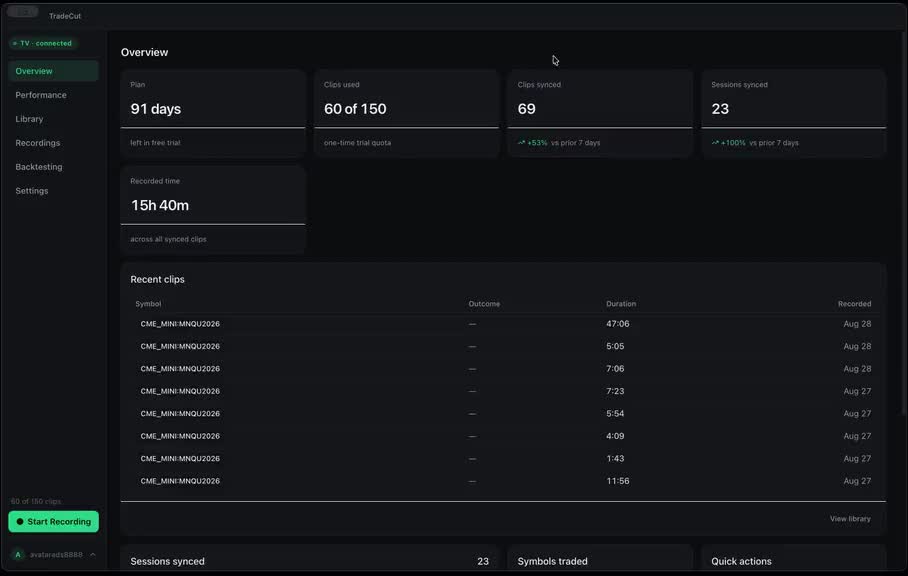
TradeCut records your trading screen in the background and saves a short clip of each trade with the symbol, side, time and result. On TradingView it detects your trades by itself, and NinjaTrader 8 works through an add-on. For how it fits evaluations and funded accounts, see the prop firm trading journal. Still in the Combine? Read how to pass the Topstep Combine.
FAQ
What is a Topstep funded account?
It's the Express Funded Account (XFA), the simulated funded account you get after passing the Trading Combine. Its balance starts at $0, and you can hold up to 5 active XFAs at a time.
Does a 50K Topstep XFA start with $50,000?
No. The balance starts at $0. 50K / 100K / 150K is buying power, not the starting balance.
What happens if I hit the Maximum Loss Limit in my XFA?
The account is closed permanently. Back2Funded may let you reactivate it, up to 2 times, if you're eligible.
What are the Topstep payout rules?
Standard path: 5 winning days of $150 or more, plus net profit above $0 since your last payout. Consistency path: at least 3 trading days, with your largest winning day at 40% or less of total net profit. On both: up to 50% of the balance per payout, capped by account size, a 90/10 split and a $125 minimum.
Can I switch payout paths later?
No. You pick Standard or Consistency when you activate the XFA, and you can't switch later.
Does TradeCut connect to my Topstep account?
No. TradeCut has no connection to Topstep or any broker and never asks for your login. It records your screen, and on TopstepX you mark each trade yourself.
TradeCut is not affiliated with Topstep. Rules checked on Topstep's Help Center on November 13, 2026; always confirm the current rules there.
Related posts
- How to Record Your Trading Screen and Turn Trades Into Clips for Social MediaThree ways to record your trading screen and turn trades into clips: OBS + CapCut by hand, the OBS replay buffer, or automatic per-trade clips with TradeCut.
- How to Write a Trading Plan You Actually Follow (With Example)A simple trading plan example with 6 rules: daily loss limit, max trades, size, revenge trades, hours and stops. Plus a free tool that alerts you when you break it.